
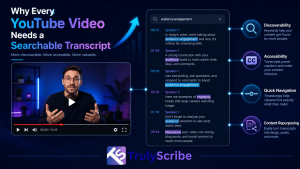
YouTube is the second-largest search engine in the world, but most videos uploaded to it are functionally invisible to search — not because the content isn’t valuable, but because there’s no clean, accurate text attached to it that search engines, viewers, or AI tools can actually read. A 20-minute video might contain exactly the answer someone is searching for, buried at the 14-minute mark with no way for a search engine, or the viewer, to know that without watching the whole thing.
A searchable transcript fixes that. It turns a video from a single opaque file into a page full of indexable, quotable, translatable text — and it does it for every video you’ve ever published, not just new ones. This piece covers exactly why that matters, where YouTube’s built-in auto-captions fall short, and how to build a transcript workflow that actually pays off in discoverability, accessibility, and repurposed content.
This applies whether you’re running a single channel or managing content across dozens of them. The videos that benefit most are often the ones that never got much attention at launch — an older tutorial or explainer sitting quietly in a back catalog, waiting for the right search query to find it, if only there were text attached to it that a search engine could actually match against.
Why a Transcript Matters More Than Most Creators Realize
Search engines can’t watch video, but they can read text
Google and YouTube’s own search algorithms rely heavily on text signals to understand what a video is actually about. Without a transcript, that understanding is limited to whatever’s in the title, description, and tags — a tiny fraction of the actual content. A full transcript helps search engines read and index your video content far more completely, often surfacing a video for dozens of specific phrases it would otherwise never rank for.
AI search tools read transcripts, not video
As more discovery shifts toward AI-powered search and answer engines, having clean, structured transcript text available is increasingly a factor in how content gets surfaced in tools like ChatGPT. A video without a transcript is effectively invisible to these systems, no matter how good the content actually is. This broader shift is covered in more depth in a complete guide to optimizing video for generative engines.
Accessibility isn’t optional anymore
Captioned, transcribed video serves viewers who are deaf or hard of hearing, viewers watching without sound, and non-native speakers who follow written text more easily than fast spoken audio. It’s also increasingly a legal expectation, not just a courtesy — covered in more detail in ADA and WCAG accessibility requirements for video content.
Transcripts are the raw material for everything else you publish
A single accurate transcript can become a full blog post, a set of social captions, or a newsletter section, without writing any of it from scratch. Creators already do this by turning video and podcast transcripts into blog content and repurposing key moments into social and LinkedIn posts — turning one recording session into a week’s worth of content instead of a single upload.
Viewers use transcripts to decide whether to watch at all
Many viewers skim a transcript before committing to a 20-minute video, especially for tutorials, reviews, or long-form interviews. A searchable transcript lets them confirm the video actually covers what they’re looking for, which can improve both click-through and watch-through rates rather than hurting them.
Why YouTube’s Auto-Captions Aren’t Enough
YouTube automatically generates captions for most videos, and it’s tempting to assume that solves the problem. In practice, auto-captions fall short in several specific ways:
- Accuracy gaps: auto-captions still struggle with accents, technical terminology, product names, and overlapping speakers, producing errors that undermine both readability and SEO value.
- No punctuation or structure: auto-generated captions are typically a raw stream of words with minimal punctuation, making them hard to read as a standalone transcript.
- Not easily exportable or reusable: auto-captions live inside YouTube’s player and aren’t formatted for repurposing into a blog post, translated document, or downloadable resource.
- No speaker labels: for interviews, panels, or multi-host videos, auto-captions don’t reliably distinguish who’s speaking, which matters for both readability and accurate quoting.
- Limited language support and translation quality: auto-caption translation into other languages is usually far less accurate than a proper translated transcript.
None of this means auto-captions are useless — they’re a reasonable baseline. But treating them as a substitute for a clean, accurate, exportable transcript leaves real SEO, accessibility, and repurposing value on the table.
It’s worth adding that auto-caption quality varies significantly by content type. A single host speaking clearly to camera in a quiet room tends to get reasonably usable auto-captions. A panel discussion, a technical tutorial full of product names, or anything recorded with background noise is exactly where the gaps widen — which, not coincidentally, describes a large share of the video content businesses actually publish.
How to Add a Proper Searchable Transcript to Your YouTube Videos
Step 1: Generate an Accurate Transcript
Start with a transcription tool built for accuracy rather than relying solely on auto-captions. A good transcript should include correct punctuation, speaker labels for multi-person videos, and timestamps — all of which make it usable for far more than just captions.
Step 2: Clean Up Names and Terminology
Review the transcript for any misheard product names, brand terms, or technical vocabulary before publishing it anywhere. This matters even more for niche or technical channels, where a single miscaptured term can undercut both accuracy and searchability for the exact phrases people are searching.
Step 3: Upload Proper Closed Captions, Not Just Auto-Captions
Export the cleaned transcript as an SRT or VTT file and upload it directly to YouTube as a caption track, rather than leaving auto-captions as the only option. This immediately improves caption accuracy for every viewer who turns captions on, and it’s a stronger accessibility baseline than YouTube’s automatic version.
Step 4: Publish the Full Transcript Alongside the Video
Add the complete transcript to the video description, or better, publish it as a dedicated page or blog post linked from the video. This is what actually makes the content indexable as text — a caption track alone doesn’t give search engines a standalone page to rank.
Step 5: Translate for Any Additional Languages Your Audience Speaks
If your audience includes non-English speakers, translating the transcript multiplies its reach without re-recording anything. This is the same logic behind a broader multilingual content strategy built on AI transcription, and tools built for specific languages — like turning Malayalam, Telugu, or Khmer video into accurate text — make this practical even for less commonly supported languages.
Step 6: Repurpose the Transcript Into Additional Content
The same transcript that powers captions and SEO can become a blog post, a thread, or a set of short clips with quote overlays pulled directly from the text. Doing this consistently is what turns a single video upload into an entire week of content across formats, rather than a one-off publish.
Step 7: Use the Transcript to Build Chapters and Timestamps
A structured transcript makes it far easier to identify natural chapter breaks and add accurate timestamps to the video description — both of which YouTube surfaces directly in search results and improve navigation for viewers looking for a specific section.
This step is easy to skip but worth doing consistently: videos with clear chapter markers tend to see better retention on the sections viewers actually care about, and timestamped descriptions give search engines yet another layer of structured text to associate with specific moments in the video, not just the content as a whole.
Auto-Captions vs. a Proper Transcript
| Factor | YouTube Auto-Captions | Proper Transcript |
| Accuracy on jargon/accents | Inconsistent | Reliable with a purpose-built tool |
| Punctuation and readability | Minimal | Fully punctuated, structured |
| Speaker labels | Not supported | Included by default |
| Exportable for blogs/translation | No | Yes — DOCX, PDF, SRT, VTT |
| Indexable as a standalone page | No | Yes, when published as text |
Common Myths About YouTube Transcripts
“Auto-captions are basically the same thing”
Auto-captions solve real-time viewing, but they’re rarely accurate or structured enough to serve as a standalone transcript, and they’re not easily reusable outside the YouTube player.
“Publishing a transcript will hurt watch time”
There’s little evidence that a published transcript reduces watch time. Viewers who wanted to skim didn’t have to search the video manually to do it, and viewers who want to watch, still watch — a transcript mainly removes friction for people deciding whether to click play at all.
“Only big channels benefit from transcripts”
Smaller and niche channels often benefit more, since a full transcript can help a video rank for long-tail search phrases that would be nearly impossible to compete for using title and description alone.
“Transcripts are only useful for SEO”
SEO is one benefit among several — accessibility, content repurposing, translation, and AI search visibility are all separate, real reasons to maintain a transcript, even for a channel that isn’t actively chasing search rankings.
Where TrulyScribe Fits In
TrulyScribe is built to produce exactly the kind of transcript this workflow depends on: accurate, speaker-labeled, timestamped, and exportable directly into the formats YouTube creators actually need — SRT and VTT for captions, and DOCX or PDF for publishing as a blog post or standalone page. It supports 100+ languages and dialects, so translating a transcript for a global audience doesn’t require a separate tool.
Its built-in editor lets you review the transcript against the original video and correct any names or terms before publishing, which matters for both accuracy and the specific search phrases a video is trying to rank for. And because the same transcript can feed captions, a blog post, and social content simultaneously, it turns transcript creation from a one-time SEO task into the foundation for a channel’s entire content repurposing workflow.
For channels publishing regularly, it’s also worth thinking about transcripts as a long-term asset rather than a per-video chore. A searchable archive built from every transcribed video lets you find exactly where a topic was covered months or years ago, without re-watching anything — useful for planning new content, answering audience questions, and avoiding duplicate coverage of the same topic.
Frequently Asked Questions (FAQs)
Do YouTube transcripts actually improve search rankings?
Yes, indirectly. YouTube’s algorithm and Google Search both use text signals to understand video content, and a full transcript gives them significantly more to work with than a title and description alone, often helping a video surface for specific phrases spoken in the content.
Are YouTube’s automatic captions good enough on their own?
They’re a reasonable baseline for real-time viewing but fall short as a standalone transcript — accuracy on jargon and accents is inconsistent, there’s minimal punctuation, and auto-captions aren’t easily exported for blog posts, translation, or other reuse.
Where should I publish my video’s transcript?
At minimum, upload it as a proper SRT or VTT caption file on YouTube itself. For the biggest SEO benefit, also publish the full transcript as a blog post or dedicated page on your own website, since that’s what gives search engines a standalone, indexable page.
Will publishing a full transcript hurt my ad revenue or watch time?
There’s no strong evidence that publishing a transcript reduces watch time or revenue. It primarily helps viewers decide whether to watch and improves discoverability, which more often increases overall views than reduces them.
Can I use a transcript to translate my videos for other markets?
Yes — translating an accurate source transcript is far faster and cheaper than dubbing or subtitling from scratch, and it’s the same underlying process used for broader multilingual content and video localization.
How long does it take to get a usable transcript for a YouTube video?
With a dedicated transcription tool, most videos can be transcribed in a few minutes, well under the length of the video itself, with a short review pass afterward to correct any names or technical terms before publishing.
The Bottom Line
A YouTube video without a proper transcript is leaving discoverability, accessibility, and repurposing value on the table — not because the content isn’t good, but because nothing about it is readable by search engines, AI tools, or viewers who’d rather skim than watch. Auto-captions cover the bare minimum; a clean, accurate, exportable transcript is what actually unlocks the rest.
If you’re publishing regularly and want a transcript workflow that doesn’t add hours to every upload, TrulyScribe is built to make this fast — accurate, multilingual, exportable transcripts ready to become captions, blog posts, and social content from the same source video.