Creating Global Training Materials Using AI Transcription
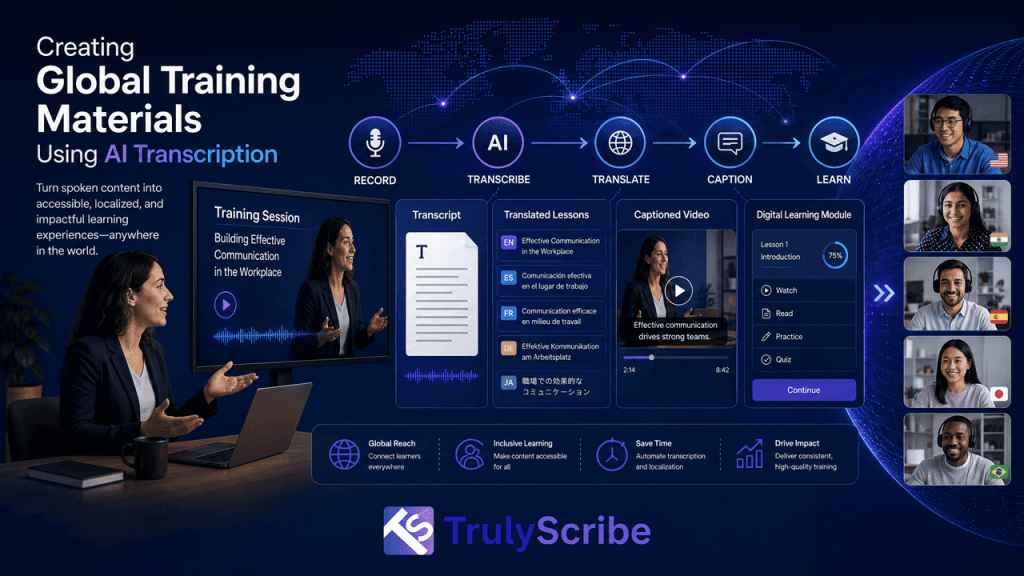
Most corporate training starts life as a single recorded session — a trainer walking through a process, a product demo, an onboarding session, a compliance briefing. The problem is what happens next: that one recording usually stays in one language, in one format, sitting in one folder, while the company’s actual workforce is spread across a dozen countries, several languages, and a mix of learning preferences that a single video rarely serves well. L&D and HR teams have historically dealt with this by treating localization as a separate, expensive project layered on top of training content that was never built to travel. Translators, voiceover studios, and subtitling vendors could turn one training video into a properly localized global asset, but at a cost and timeline that made most teams localize only their most critical content, if anything at all. AI transcription has changed that equation. What used to require a multi-vendor localization project can now start from a single accurate transcript and branch out into translated documentation, multilingual captions, searchable knowledge base entries, and accessible course materials — all from one recorded session. This guide covers how to build that workflow for your own training content. The shift matters most for the training content that never got localized under the old model — not the flagship onboarding video every new hire eventually sees, but the everyday process walkthroughs, policy updates, and internal briefings that make up most of what L&D teams actually produce. Those are exactly the assets a per-vendor, per-language agency workflow was too expensive to touch, and exactly where an AI-powered pipeline pays off fastest. Why Global Training Content Needs a Different Approach The Old Way vs. the AI-Powered Way Traditional global training localization involved sending a video to a translation agency, waiting for a script translation, then booking voiceover talent or a subtitling vendor for each target language — often with a per-minute rate stacked at every stage. For a single 30-minute training module localized into five languages, that could easily take two to three weeks and cost several thousand dollars, which is why most companies reserved full localization for only their highest-priority content. The AI-powered approach collapses that into a single pipeline: transcribe the session once, translate the transcript into as many languages as needed, generate captions and localized documentation automatically, and optionally add AI-dubbed narration for priority languages. The same accurate source transcript becomes the foundation for every downstream asset, which is what makes it realistic to localize routine training content, not just the handful of videos that used to justify agency fees. This also changes who can own the process. Under the agency model, localization sat with procurement and a specialized vendor relationship. Under an AI-powered pipeline, an L&D team can manage the entire cycle themselves — recording, transcribing, translating, and publishing — without waiting on an external partner’s queue, which is often the bigger practical win even before the cost savings are factored in. Traditional vs. AI-Powered Training Localization Factor Traditional Agency Workflow AI-Powered Workflow Turnaround (5 languages, 30-min session) 2–3 weeks Same day to a few days Cost (captions and docs only) $1,500 – $4,000 Well under $500 Minimum project size Often required by agencies None — scales to a single session Updating content later New vendor quote for each revision Re-run the pipeline in minutes These figures are illustrative rather than fixed quotes, but they reflect the scale of change teams typically see: AI doesn’t just lower the cost of localizing training content, it removes the minimum-project-size problem that used to keep routine training videos untranslated in the first place. The AI Transcription Workflow for Global Training Materials Step 1: Record or Gather the Source Training Session Whether it’s a live workshop, a recorded onboarding walkthrough, or a webinar-style compliance briefing, start with the cleanest audio you can capture — a decent microphone and a quiet room measurably improve transcription accuracy, which carries through every language version that follows. Step 2: Transcribe the Session Accurately Turn the recording into an accurate, speaker-labeled transcript. Training content is often full of product names, internal terminology, and process-specific vocabulary, so it’s worth using a transcription tool that handles technical and industry-specific jargon reliably rather than guessing at unfamiliar terms. For panel-style or multi-trainer sessions, accurate speaker labeling in multi-speaker recordings keeps the transcript usable when it’s later split into role-specific reference material. Step 3: Clean Up and Structure the Transcript Review the transcript for any misheard names, product terms, or acronyms, and break it into clear sections that mirror the structure of the training itself — introduction, core process steps, examples, and Q&A. This structured version becomes the master document every other language and format is generated from, so it’s worth getting right once rather than fixing the same error five times across five languages. This is also a good point to add a short glossary of company- or product-specific terms alongside the transcript. Feeding that glossary into the translation step later keeps terminology consistent across every language, rather than having the same product name or internal acronym translated differently depending on which session it appears in. Step 4: Translate Into Every Language Your Workforce Needs With a clean, structured transcript, translating into multiple languages becomes a matter of running it through a machine translation engine rather than briefing a translator from scratch for every new language. This is the same logic behind a broader multilingual content strategy built around AI transcription, and it’s worth checking which languages your transcription platform actually supports before committing to a rollout list, since coverage and accuracy vary between languages. Step 5: Generate Captions and Accessible Course Materials Export translated, timestamped transcripts as SRT or VTT files for any video-based training, and as DOCX or PDF documents for written reference material. This step does double duty: it makes training content usable for employees who are deaf or hard of hearing, and it supports ADA and WCAG accessibility compliance, which is increasingly a requirement for corporate training programs,