Trulyscribe

Video Transcription

text-based-video-editing-workflow-post-production
Freelance Growth, Post-Production, Video Transcription

The Text-Based Video Editing Workflow: Scale Post-Production Output

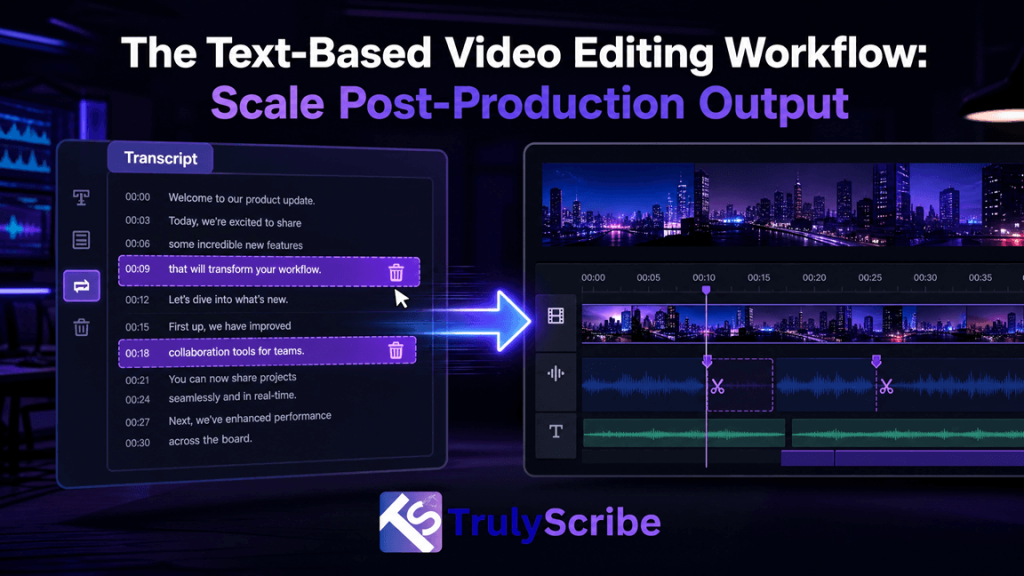
The most frustrating bottleneck in video editing isn’t color grading, complex motion graphics, or sound design. It’s the tedious, manual grind of digging through hours of talking-head footage, documentaries, corporate interviews, or zoom calls just to find a single missing quote or build a cohesive narrative. For solo freelance video editors and post-production subcontractors, this time sink directly limits income. When billing clients per project, hours spent scrubbing back and forth across a timeline to sync talking points are completely unbillable. The industry has moved beyond this bottleneck. By shifting to a text-based video editing workflow, you can treat raw footage like a text document—cutting, searching, and organizing an initial rough cut in minutes instead of days. What is a Text-Based Video Editing Workflow? A text-based video editing workflow replaces manual timeline scrubbing with interactive, timecoded transcription. Instead of tracking audio waveforms visually or listening to files at double speed, the entire video is converted into text. The Core Shift: Editing text automatically edits the video timeline. When you delete a sentence from the transcript, the linked video clip is trimmed instantly. When you search for a concept, the playhead jumps directly to that frame. For freelancers working as subcontractors for agencies, production companies, or corporate clients, this workflow bridges the gap between raw footage and a tight paper edit (a script built out of transcript components before heavy software editing begins). Why Manual Scrubbing is Killing Your Freelance Profit Margins Consider a standard project: a client delivers three separate 45-minute raw corporate interviews and requests a tight, 3-minute promotional highlight reel. Under a traditional manual post-production workflow, the time breakdown looks grim: Post-Production Stage Traditional Workflow Text-Based Workflow Initial Review 135 minutes (Watching footage at 1x speed) 0 minutes (Automated parsing) Logging & Timestamps 90 minutes (Typing out notable quotes) 5 minutes (TrulyScribe automated export) Rough Cut Assembly 120 minutes (Slicing, grouping, closing gaps) 15 minutes (Text-selection compilation) Client Review Prep 30 minutes (Adding temporary subtitles) 2 minutes (Automated SRT integration) Total Administrative Time 375 minutes (6.25 hours) 22 minutes Using manual methods, you waste nearly a full working day on organizational administration before you even touch creative assets like B-roll, pacing, transitions, or sound layers. A text-based editing approach completely reclaims these lost billable hours. Step-by-Step Blueprint: The Text-Based Post-Production System To get the full time-saving benefit, you need to decouple the initial narrative structuring from your heavy Non-Linear Editor (NLE) software like Adobe Premiere Pro, DaVinci Resolve, or Final Cut Pro. Step 1: Batch-Upload Raw Footages to TrulyScribe Do not immediately import massive, unorganized multi-gigabyte source video files directly into your primary video editing timeline. This bogs down your computer’s local processing performance and clutters your software media workspace. Instead, run your raw multi-speaker files through TrulyScribe first. The platform processes raw files rapidly in the cloud, generating highly accurate, time-stamped text files complete with clear speaker differentiation. Step 2: Perform the “Paper Edit” Digitally Once the transcript populates, review the text. Use the search functions to find primary talking points, key phrases, or thematic responses. Step 3: Align the Transcript to the NLE Timeline Import your raw source video footage into your choice of desktop NLE (Premiere Pro, DaVinci, or Final Cut). Instead of guessing where edits should go, open your exported, timestamped TrulyScribe script on a secondary monitor. Because the script explicitly dictates where the best narrative arcs begin and end down to the exact second (e.g., [00:14:22 – 00:14:45]), you can snap your blade tool precisely to those timeline positions on your first pass. Step 4: Rapid Assembly of the Rough Cut With your text blueprint guiding your actions, perform a rapid extraction pass. Splice the selected audio segments out, push them together into a unified sequence line, and strip out the dead space. You now have a clean narrative spine ready for your primary creative additions: dropping relevant secondary B-roll over jump cuts, balancing dialogue tracks, color matching, and mastering final audio components. Advanced Subcontractor Techniques: Managing Remote Clients Asynchronously If you work as a freelance subcontractor for creative agencies, your greatest friction point is often the client review phase. Clients frequently send vague revision notes like “Can we change that middle quote to something that sounds a bit more punchy?” Instead of opening your NLE and hunting blindly for alternative clips, use your transcript assets to manage client communication completely asynchronously: FAQs: Text-Based Video Editing Workflows
Transcription Tips for Short-Form Video
Video Transcription, Accessibility & Compliance, AI & Automation in Media, AI Transcription Tools, Media Localization & Accessibility, Subtitling & Captioning, Transcription, Video Localization

From YouTube to TikTok: Transcription Tips for Short-Form Video Success

Why Video Transcription Is Essential for Short-Form Video Success Long-form video is no longer the end of the content journey—it’s just the beginning. Today’s most successful creators, media companies, and brands are repurposing YouTube videos into short, high-impact clips for TikTok, Instagram Reels, and YouTube Shorts. At the heart of this transformation lies one critical enabler: video transcription. Whether you’re a content creator, a localization project manager, or a post-production supervisor, transcription is the foundation for effective short-form video captions, accessibility, and global reach. In this guide, we’ll explore how to move seamlessly from YouTube to TikTok using smart transcription workflows, AI-powered subtitling, and platform-specific best practices. Why Video Transcription Is the Backbone of Short-Form Video Short-form video platforms are built for speed, silent viewing, and global audiences. According to multiple industry studies, over 80% of social media videos are watched without sound, and videos with captions consistently outperform those without. This makes video transcription essential—not optional. Key benefits of transcription for short-form video: For industries like media & entertainment, e-learning, broadcasting, and corporate communications, transcription also supports compliance, scalability, and faster turnaround times. From YouTube to TikTok: Why Transcription Comes First Repurposing long-form YouTube videos into short clips isn’t just about trimming footage. TikTok, Reels, and Shorts demand a different storytelling rhythm—faster hooks, tighter captions, and visual-first communication. This is where YouTube to TikTok transcription plays a crucial role. How to transcribe YouTube videos for TikTok captions Instead of manually rewatching hours of footage, professional teams and creators follow this workflow: This approach allows video editors, social media managers, and localization teams to work faster and more accurately—especially when handling large content volumes. Best Transcription Format for Short-Form Social Videos Not all transcripts are created equal. A verbatim transcript that works for YouTube may not work for TikTok. Best transcription format for short-form social videos: For subtitling specialists and dubbing producers, this clean transcript also becomes the base file for: Subtitle Timing Tips for Vertical Short-Form Videos Timing matters more than text volume on short-form platforms. Captions that lag—or overload the screen—can kill engagement. Subtitle timing tips for vertical short-form videos: For video production studios and post-production teams, these subtitling standards ensure platform compliance while maintaining creative integrity. How Captions Improve Engagement on Short Videos Captions don’t just improve accessibility—they drive performance. How captions improve engagement on short videos: For digital marketing and performance marketing agencies, captioned videos often result in: This is why short-form video captions are now a non-negotiable part of social media strategy. AI Transcription for TikTok and Instagram Reels: What to Know AI has transformed transcription speed and scalability. AI transcription for TikTok and Instagram Reels allows teams to process large content libraries quickly—but quality control remains critical. Where AI subtitle generation works best: Where professional review is essential: Localization project managers and media localization managers often combine AI with human review to balance speed, accuracy, and cultural nuance. Multilingual Subtitles for Short-Form Video Content Short-form video is global by default. A TikTok posted today can reach audiences in Europe, Asia, the Middle East, and Latin America within hours. Why multilingual subtitles matter: For video localization services, transcription is the starting point for: This is especially critical in multilingual and localization-heavy regions such as Latin America, Western & Eastern Europe, Africa, and Southeast Asia. Transcription Workflow for Repurposing Long Videos A scalable transcription workflow benefits creators and enterprises alike. A proven transcription workflow for repurposing long videos: This workflow is widely used across: Real-World Scenario: One Video, Multiple Markets Imagine a YouTube interview published by a media brand in the United States. Using transcription: With one source video, the brand reaches audiences in North America, Latin America, Europe, and the Middle East—without re-recording or re-editing from scratch. That’s the power of transcription-led content strategy. Conclusion: Transcription Is the Smartest Way to Win Short-Form Video Short-form video success isn’t just about trends or algorithms—it’s about clarity, accessibility, and speed. Video transcription enables creators, marketers, and media teams to repurpose content efficiently, improve engagement, and scale globally. Whether you’re producing TikToks, managing localization projects, or delivering accessible content, transcription is the foundation that makes everything else possible. Ready to elevate your short-form video strategy? Our team provides professional transcription, subtitling, dubbing, voice-over, video localization, and audio description services tailored for creators, media companies, and global brands. 👉 Contact us today to transform your long-form content into high-performing, globally accessible short-form videos. Frequently Asked Questions (FAQs)

Video Transcription for Accessibility ADA & WCAG Compliance Explained
Video Transcription, Accessibility & Compliance, AI Transcription Tools, Captions & Subtitles, Media Localization

Video Transcription for Accessibility: ADA & WCAG Compliance Explained

Why Video Accessibility and Transcription Matter Today Video has become the most powerful medium for communication—used across corporate training, e-learning, marketing, OTT platforms, podcasts, and digital publishing. But as video usage grows, so does the responsibility to make content accessible to everyone. This is where video transcription plays a critical role. From meeting ADA compliance in the United States to adhering to WCAG accessibility standards globally, accessible video transcription is no longer optional—it’s essential. In this guide, we’ll break down how video transcription supports accessibility, what ADA and WCAG really require, and how AI-powered platforms like TrulyScribe help organizations meet compliance at scale. Why Accessibility Matters More Than Ever in Video Content Accessibility is no longer just about inclusion—it’s about legal compliance, audience reach, and brand trust. According to the World Health Organization, over 1.5 billion people worldwide live with some form of hearing loss. Add to that non-native speakers, people watching videos without sound, and users relying on assistive technologies—and it’s clear why accessibility is a business priority. Accessibility-driven trends shaping video content: Video transcription ensures that spoken content is available in text form—making videos usable, searchable, and compliant. What Is Video Transcription and Why It’s Essential for Compliance Video transcription is the process of converting spoken dialogue in a video into written text. This text can be used as: From an accessibility standpoint, transcripts are foundational. Captions and subtitles are built from accurate transcripts, making transcription the first step toward compliance. ADA & WCAG: What Do They Actually Require? ADA (Americans with Disabilities Act) The ADA requires that digital content—especially videos—be accessible to people with disabilities. This includes: This is where ADA compliant transcription becomes critical. WCAG (Web Content Accessibility Guidelines) WCAG provides international standards for accessibility. Under WCAG 2.1: Organizations often ask:Does video transcription meet WCAG requirements? The answer is yes—when combined with captions and proper formatting. How Does Video Transcription Help With ADA Compliance? One of the most searched questions is:How does video transcription help with ADA compliance? Here’s how: Using an AI video transcription tool ensures consistency and scalability—especially when dealing with large video libraries. Is AI Transcription Accurate Enough for WCAG Accessibility? A common concern is accuracy. Is AI transcription accurate enough for WCAG accessibility? Modern AI transcription platforms like TrulyScribe use advanced speech recognition models trained on diverse accents, industries, and audio conditions. When paired with human review (if needed), AI transcription achieves accuracy levels suitable for WCAG compliance. Benefits of AI transcription for accessibility: This makes accessible video transcription achievable even for high-volume content creators. Automatic Captioning Software vs Manual Transcription Manual transcription is accurate—but slow and expensive. Automatic captioning software, powered by AI, offers a smarter alternative: Feature Manual AI Transcription Speed Slow Near real-time Cost High Scalable Volume handling Limited High Compliance-ready Yes Yes (with review) Platforms like TrulyScribe bridge this gap by offering AI-driven transcription optimized for accessibility workflows. How to Make Videos Accessible Using AI Transcription If you’re wondering how to make videos accessible using AI transcription, here’s a practical workflow: This approach works across: Best AI Transcription Tool for Accessible Videos Organizations often search for the best AI transcription tool for accessible videos—one that balances speed, accuracy, and compliance. What to look for: TrulyScribe is designed for teams producing video at scale—helping them meet ADA and WCAG requirements efficiently. Real-World Scenario: Accessibility at Scale Imagine an e-learning company with: Manual transcription would take months. With AI transcription, transcripts are generated quickly, captions are created automatically, and accessibility compliance becomes manageable. This is where AI-driven platforms outperform traditional workflows. Make Your Videos Accessible with TrulyScribe Meeting accessibility standards doesn’t have to be complex or expensive. TrulyScribe is an AI-powered transcription platform built to help organizations: Whether you’re a content creator, enterprise team, or media publisher, TrulyScribe helps you make videos accessible—faster. 👉 Start using TrulyScribe to create accessible, compliant video content today. Sing Up here Frequently Asked Questions (FAQ) Final Thoughts Accessibility is not a checkbox—it’s a commitment. With increasing regulatory enforcement and growing audience expectations, video transcription has become the foundation of inclusive digital communication. By leveraging AI-powered tools like TrulyScribe, organizations can meet ADA and WCAG compliance while improving reach, usability, and brand trust. Accessible video isn’t just better—it’s smarter, scalable, and future-ready.

Scroll to Top