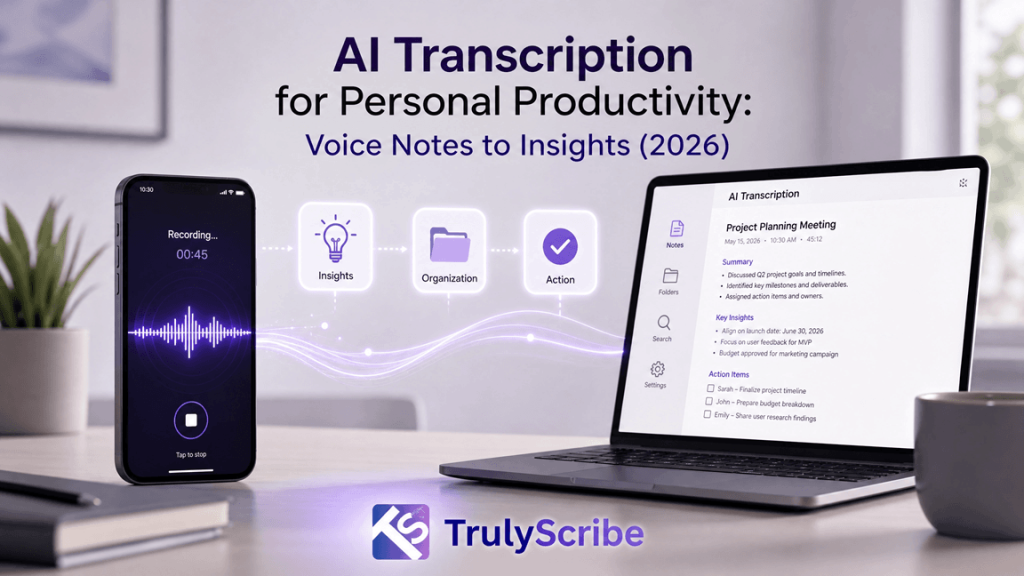
From Voice Notes to Actionable Insights: AI Transcription for Personal Productivity (2026)
Your phone’s voice memo app is quietly becoming the most cluttered drawer in your digital life. Half-finished ideas, meeting recaps, grocery lists muttered on the way to the car, a brilliant thought you had in the shower — all sitting there as untouched audio files you will “listen to later.” In 2026, AI transcription tools have finally closed the gap between recording a thought and doing something useful with it. This guide walks through how modern AI transcription turns voice notes into searchable text, structured tasks, and real insight — and how to build a voice-first productivity system around it. Why Voice Notes Alone Aren’t Enough Anymore Voice notes are the fastest way to capture a thought. Talking is roughly three times faster than typing, which is exactly why so many of us default to hitting record instead of opening a notes app. The problem isn’t capture — it’s retrieval. An audio file is a black box. You can’t skim it, search it, copy a line from it into an email, or ask it to remind you of a deadline you mentioned in passing. This is what productivity researchers sometimes call the “capture-to-action gap.” You record the idea, then the idea sits in audio purgatory until you either forget about it or spend fifteen minutes re-listening to a two-minute clip trying to find the one sentence that mattered. Multiply that across dozens of voice notes a week, and the very tool meant to save time quietly starts costing it. AI transcription closes that gap. By converting speech to text the moment it’s recorded, it turns a disposable audio clip into a permanent, searchable, shareable piece of information — the raw material for real productivity, not just raw capture. What “AI Transcription” Actually Means in 2026 Transcription software has existed for decades, but the AI transcription of 2026 is a different category of tool. Early speech-to-text engines struggled with accents, background noise, and overlapping speakers, and the output was often a wall of text nobody wanted to read. Today’s models, trained on far larger and more diverse audio datasets, handle natural, messy, real-world speech — including filler words, code-switching between languages, and multiple speakers in the same recording. A few developments define the current generation of tools: Put together, these features mean transcription is no longer just “audio turned into text.” It’s the first processing layer of a personal knowledge system — the step that makes everything you say as useful as everything you type. The Journey: From a Raw Voice Note to an Actionable Insight It helps to think of the process as a pipeline with four distinct stages. Understanding each one makes it much easier to choose the right tool and build habits that stick. 1. Capture This is the easy part most people already do well: recording a thought on a phone, a smart watch, or a dedicated voice recorder during a walk, commute, or meeting. The goal at this stage is simply to get the idea out of your head before it disappears — no editing, no structure, no second-guessing. 2. Convert The recording is uploaded or synced to an AI transcription tool, which converts speech into accurate, punctuated, speaker-labeled text within minutes. This is where tools like TrulyScribe do the heavy lifting: audio and video files are processed automatically, with support for a very wide range of languages and accents, so the transcript is usable the moment it’s ready rather than needing manual cleanup. 3. Condense Raw transcripts, especially from longer recordings, are still a lot to read. The condensing stage uses AI to pull out the signal from the noise — summarizing the recording into a short overview, highlighting decisions and action items, and organizing rambling thoughts into a clear structure. This is the stage that turns a five-minute voice note into three usable bullet points. 4. Convert to Action The final stage moves the condensed text out of the transcription tool and into wherever work actually happens: a task added to a to-do list, a line copied into an email draft, a decision logged in a project doc, or a follow-up scheduled on a calendar. This is the step that closes the loop — the moment a voice note stops being a recording and becomes something done. Most people skip stages two through four entirely and stay stuck at stage one, which is exactly why voice notes pile up unused. A good AI transcription workflow automates stages two and three so that stage four takes seconds instead of minutes. Where This Actually Helps: Everyday Use Cases AI transcription for personal productivity isn’t a niche, professional-only tool anymore. It shows up in dozens of small, practical moments across a week. What connects all of these is the same underlying shift: speech becomes data. Once a thought exists as text, it can be searched, tagged, summarized, translated, and moved into any other tool — something that’s simply not possible with a locked audio file. What to Look For in an AI Transcription Tool Not all transcription tools are built for personal productivity in the same way. Some are optimized for enterprise call centers, others for podcast editing. If your goal is turning everyday voice notes into action, a few features matter more than the rest. TrulyScribe is built around exactly this use case: unlimited AI-powered audio and video transcription with support for a very wide range of languages, automatic speaker labeling, timestamps, and export options that include DOCX and PDF, all wrapped in a straightforward editor where the transcript can be checked against the original audio in real time. For anyone trying to turn a habit of voice notes into an actual productivity system, that combination of speed, accuracy, and flexible export is what makes the difference between a tool you try once and one you use every day. Building a Voice-First Productivity System Having the right tool is only half the equation. The other half is a light structure around how you use it,